Prefer to learn by doing? Open the free GST Invoice Generator and follow along — no sign-up needed.
What Is a GST Invoice?
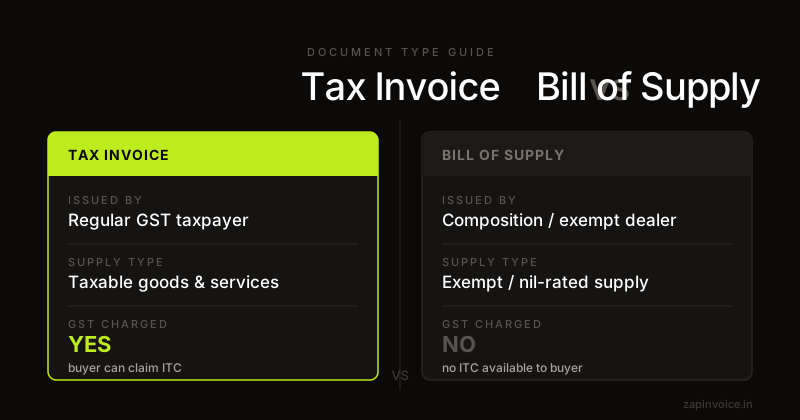
A GST invoice (also called a tax invoice) is a legal document issued by a GST-registered business to its buyer for every taxable supply of goods or services. It is the primary record for claiming Input Tax Credit (ITC) and filing GSTR-1 returns.
Under Section 31 of the CGST Act, every registered person making a taxable supply must issue a tax invoice. Failure to do so can result in penalties and loss of ITC eligibility for your buyers.
Who Needs to Issue a GST Invoice?
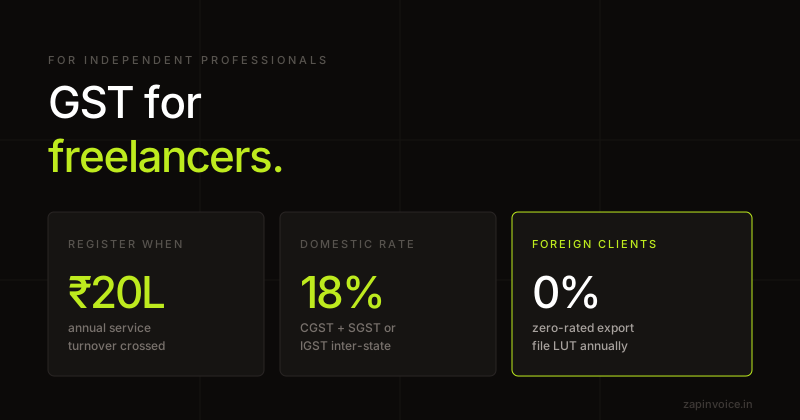
- Any business registered under GST (mandatory above ₹20 lakh turnover; ₹10 lakh for special category states)
- Businesses under Composition Scheme — must issue a Bill of Supply instead (not a tax invoice)
- Exporters — must issue an export invoice with "SUPPLY MEANT FOR EXPORT UNDER BOND / LUT WITHOUT PAYMENT OF IGST" or with IGST
- Reverse Charge Mechanism (RCM) supplies — buyer issues a self-invoice
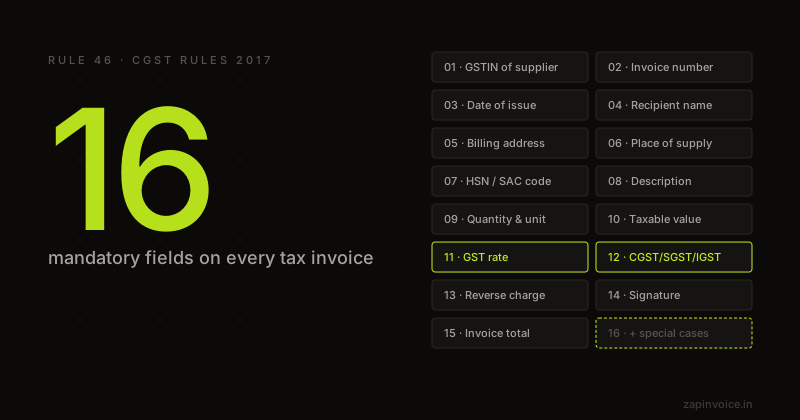
16 Mandatory Fields in a GST Invoice (Rule 46)
Under Rule 46 of the CGST Rules 2017, a tax invoice must contain the following fields:
- Name, address, and GSTIN of the supplier
- Consecutive serial number — unique, not exceeding 16 characters (alphanumeric/special characters allowed)
- Date of issue
- Name, address, and GSTIN of the recipient (if registered)
- Name and address of delivery (if different from billing address)
- HSN code for goods or SAC code for services (mandatory above ₹5 crore turnover; 2-digit for ₹5–50 crore; 4-digit for above)
- Description of goods or services
- Quantity and unit of measurement (for goods)
- Total taxable value — after discount, before tax
- Rate of tax — CGST, SGST, IGST (0%, 5%, 12%, 18%, 28%)
- Amount of tax charged — separately for CGST, SGST/UTGST, and IGST
- Place of supply — state name and code (determines intra/inter-state)
- Address of delivery where different from place of supply
- Whether the tax is payable on reverse charge basis
- Signature or digital signature of the supplier or authorized representative
- In case of export invoices — shipping bill details and port of export
CGST vs SGST vs IGST — Which Tax to Apply?
The type of GST depends on whether the supply is intra-state or inter-state:
- Intra-state supply (supplier and buyer in same state): Charge CGST + SGST, each at half the GST rate. E.g., 18% GST = 9% CGST + 9% SGST.
- Inter-state supply (different states, or any export): Charge IGST at the full GST rate. E.g., 18% GST = 18% IGST.
- Union Territories: CGST + UTGST instead of CGST + SGST.
The Place of Supply (POS) rule determines which category applies. For services, POS is typically the location of the recipient.
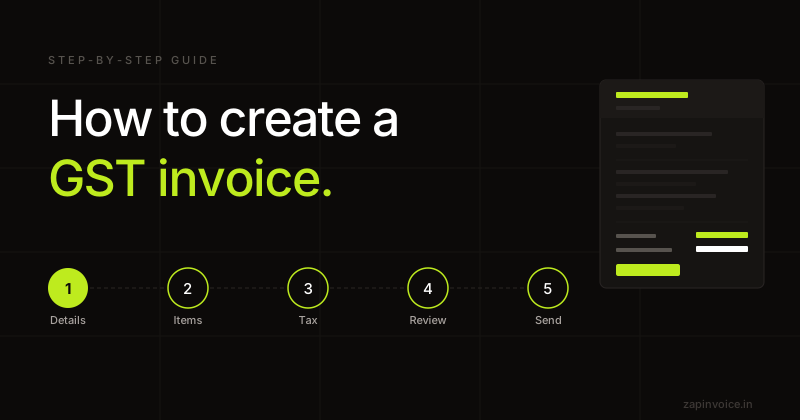
Step-by-Step: How to Create a GST Invoice
- Enter supplier details — Your business name, full address, GSTIN, state, phone, and email.
- Add invoice number and date — Use a sequential numbering system (e.g., ZAP/2026-27/001). Restart each financial year.
- Enter client details — Name, address, GSTIN, and state of the buyer.
- Determine Place of Supply — Usually the buyer's state. This decides CGST+SGST vs IGST.
- Add line items — Description, HSN/SAC code, quantity, unit price, and GST rate.
- Apply discounts (if any) — Discount reduces taxable value, not the tax amount.
- Calculate taxes — The tool auto-splits CGST/SGST or applies IGST based on POS.
- Add payment terms and bank details — Optional but professional.
- Review and download — Verify all mandatory fields before issuing.
Common Mistakes to Avoid
- Wrong GSTIN format — A valid GSTIN is 15 characters: 2-digit state code + 10-character PAN + entity number + checksum.
- Applying wrong tax type — Using CGST+SGST for an inter-state supply (should be IGST) is a compliance error.
- Incorrect Place of Supply — Especially for services — always use the buyer's state, not supplier's.
- Missing HSN/SAC code — Mandatory above ₹5 crore. Add it to avoid GSTR-1 mismatches.
- Editing issued invoices — Never modify a sent invoice. Issue a credit note or debit note instead.
- Skipping invoice serial number — Must be consecutive and unique within a financial year.
Invoice Time Limits Under GST
- Services: Within 30 days from date of supply of service
- Goods: Before or at the time of removal/delivery
- Continuous supply of services: On or before each due date of payment
- Banks and NBFCs: Within 45 days from date of supply